


Multi-Stop Route Planner
4.61.14K Reviews
App Specs
- Version
- 26.07.20.01
- Updated On
- License
- Free
- Downloads
- 1,000,000+
- Developer
- MapoScope - Delivery Route Optimization Experts
- Categories
- Maps & Navigation
- Platform
- Android
Screenshots

 Analysis by AppCompare
On a day with several appointments or errands, the difficult part is often not finding each address but choosing an order that avoids needless backtracking. That is the problem Multi-Stop Route Planner is built around. I find its central idea useful: collect multiple destinations into one route, then let the app work out a sensible sequence instead of making me decide stop by stop.
Why organizing several stops matters
A regular navigation app is usually strongest when I already know where I am going next. A route planner has a different job: help arrange the destinations before the trip begins. That distinction matters when the day includes a string of deliveries, client visits, or household tasks spread across town. The value is not simply seeing directions on a map; it is avoiding the extra distance that can come from choosing stops in a haphazard order.
The app is free to install, with optional in-app purchases, and is made by MapoScope - Delivery Route Optimization Experts. It sits in the maps and navigation category, has an average rating of 4.6 from around 16,000 ratings, and has been installed over a million times. Its Everyone age rating makes it broadly accessible. Those figures suggest it has found an audience, but the important question for me is whether its planning approach suits the way you actually travel.
Planning a route that fits the day
When I first opened the app, the interface struck me as incredibly user-friendly. No overwhelming menus or confusing icons—just a clean, straightforward layout that invites you to start planning right away. It's like the app knows you're in a rush and doesn't want to waste your time. The onboarding process was quick, guiding me through the basic features without any fuss.
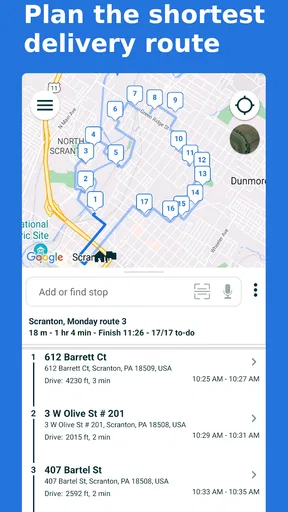
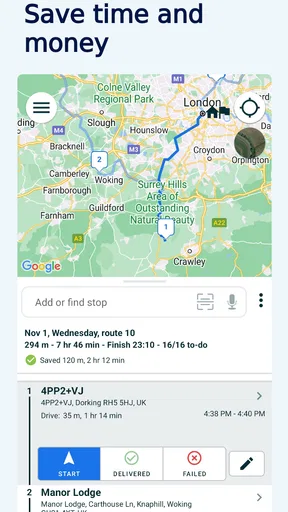
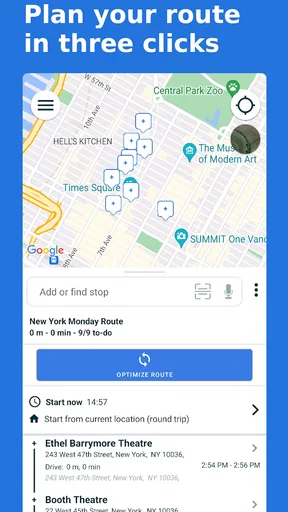
Setting up my first route was a breeze. All I had to do was enter my list of stops and the app took care of the rest. It calculates the optimal route in seconds, taking traffic and other real-time data into account. The result? A perfectly plotted journey that saves both time and fuel. Pretty neat, right?
Making a stop list practical
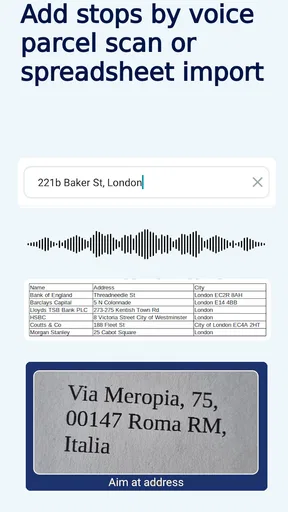
One feature I absolutely love is the ability to add unlimited stops. Whether you’re a delivery driver, a sales rep, or just someone with a busy schedule, this is a game-changer. No more guesstimating the best order to tackle your errands; the app does all the heavy lifting.
In practice, I would treat the proposed order as a useful starting point, not as a promise that every stop will fit neatly into the day. Before setting off, I’d check that each address is correct and think about any commitments that impose a fixed order: a timed appointment, a parcel that must be collected before a shop closes, or a stop where parking is difficult at certain times. Route optimization can help arrange the journey, but it cannot know the importance of each errand unless that constraint is reflected in how you plan.
Worth Reading Before You Choose

EA SPORTS FC Mobile 26 Is a Bigger Football Game, but It Takes Time

Flipboard Shows What News Apps Must Do Beyond the Feed

Switching to Android Auto Means Rethinking Your Driving Routine

Google Calendar Makes a Crowded Week Easier to Manage

Ludo King Makes the Most of the Minutes Between Plans

Baby Panda World Brings Quick Play to Modern Phones, but Its Game Library Feels Busy
A small workflow choice can make the route more useful: group destinations that share a real-world constraint before optimizing. For example, if one errand has to happen before lunch, plan around it rather than accepting a mathematically tidy sequence that conflicts with your schedule. I also find it sensible to keep a written or saved note of what each stop is for. Address lists are easy to misread when several locations look alike, and a quick label can prevent an avoidable detour.
From the planned route to the road
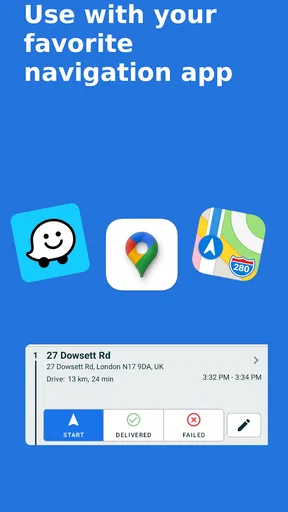
Another highlight is the integration with Google Maps. It offers turn-by-turn navigation, making it seamless to hop from one destination to the next. Plus, it updates routes in real-time, ensuring you're always on the most efficient path even if traffic conditions change.
This division of labor is practical: use the planner to organize the sequence, then rely on navigation for the drive itself. It also gives me a useful checkpoint between planning and departure. I can review the list, catch a misspelled street or an address entered in the wrong part of town, and then start navigating. When the day changes, I would reassess the remaining stops rather than blindly following an earlier plan; a new priority or closed destination can make the original order less useful.
The app also syncs with your calendar, which can help when the stops are tied to a working schedule. I would still check imported appointments against the actual route before leaving. A calendar tells me when something is booked, while the route tells me how the locations fit together; those are related but not identical tasks. Allowing a little breathing room between distant appointments is wiser than treating the estimated route as a guarantee that I will arrive exactly on time.
A realistic day with several errands
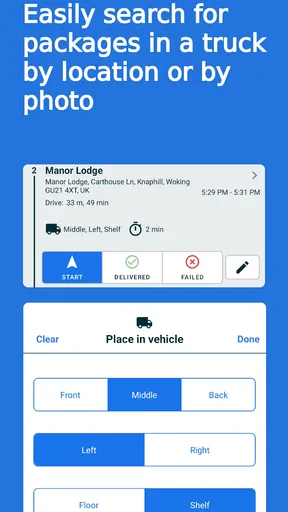
Imagine I have a morning appointment, a return to drop off, groceries to pick up, and a parcel to collect from another neighborhood. With an ordinary navigation app, I could enter each destination as I go, but I would still be making the ordering decisions myself. Here, I can gather the stops first and use the planned route to see a more coherent sequence. If the appointment is fixed, I can keep it as the anchor and arrange the flexible errands around it.
That is where this kind of tool earns its place: not necessarily on a simple trip from home to one shop, but on a day where several destinations compete for attention. A delivery driver or field worker may benefit from planning before leaving, while someone doing occasional errands may only need it on particularly busy days. In either case, the practical win is having the route thought through before getting behind the wheel, rather than repeatedly deciding what comes next while already out.
For a very small number of stops, opening a familiar map app and navigating manually may be quicker. A dedicated planner becomes more appealing as the list grows or when the destinations are scattered enough that intuition is unreliable. That comparison is important: this is not a replacement for every navigation app or a reason to optimize a simple commute. It is a planning layer for a more complicated day.
Where the experience can be less smooth
So, how does the Multi-Stop Route Planner hold up in daily use? In one word: excellently. I tested it on a busy Saturday filled with errands scattered across town. The app directed me flawlessly, cutting down my travel time significantly. I was able to squeeze in an extra coffee break, which never happens!
I also appreciated the app’s battery efficiency. It didn't drain my phone's juice, which is always a concern with GPS-heavy applications. The app seemed to strike a balance between functionality and power consumption, something I found quite impressive.
Even a well-ordered route can be disrupted by ordinary realities: a hard-to-find entrance, a parking search, a queue, or an appointment that runs long. I would avoid scheduling a packed chain of stops with no slack and then blaming the route when the day slips. The planner can organize travel between addresses, but it does not remove the time spent at each destination. For work where arrival windows are strict, I’d leave a buffer and check the itinerary again if a delay changes what is feasible.
Calendar syncing is useful, though I noticed the occasional hiccup in syncing with my calendar. It’s not a dealbreaker, but it would be great to see this feature become more seamless in future updates. If your whole day depends on appointments appearing correctly, verify the plan in the app rather than assuming that a successful calendar entry has automatically become a dependable route.
A few users have mentioned the desire for a built-in weather feature. Imagine integrating weather forecasts to help plan for rain or other conditions that might affect your route. It’s a minor detail but could add significant value. For now, I would check weather separately when it could change how long outdoor stops take or what I need to bring. That extra step is manageable, but it underlines that route order is only one part of planning a day out.
Who will get the most from it
I’d recommend this app most readily to people who regularly visit several addresses in one outing and want help deciding the order: delivery workers, sales representatives, mobile service professionals, and anyone with a dense list of errands. The current version is 25.12.08.01, and it requires Android 6.0 or later. That makes the Android app accessible on a range of devices, though anyone using a phone with an older operating system will need another option or a compatible device.
The free download makes it easy to try the basic planning experience, while in-app purchases range from $4.99 to $99.95 per item. I’d check what an optional purchase covers and whether it matches how often I expect to use the app before paying. If I only plan a multi-stop day now and then, I would first see whether the free version handles that routine. A frequent professional user may have a stronger reason to consider paid options, but should decide based on their actual workflow rather than assuming every purchase is necessary.
If you mostly travel to one destination at a time, or prefer to choose every turn and stop yourself, a standard navigation app may be all you need. Likewise, if your schedule is dominated by fixed appointment times, route order alone will not solve the harder problem of managing arrival windows. I see this planner as most useful when there is flexibility in the sequence and enough stops for a better order to matter.
A practical recommendation
In conclusion, Multi-Stop Route Planner is a must-have app for anyone looking to optimize their travel routes. Whether you're a professional on the go or just trying to manage a hectic day efficiently, this app packs a punch. Its intuitive interface, real-time updates, and seamless calendar integration make it stand out in a crowded market.
If you're tired of wasting time and gas on inefficient routes, give this app a try. You might just find it becomes an indispensable part of your daily routine. And who knows, maybe you'll end up with a little extra time for yourself, too!
Pros
- Efficient route optimization saves time.
- User-friendly interface for easy navigation.
- Supports multiple stops in a single route.
- Real-time traffic updates included.
- Integrates with GPS for precise tracking.
Cons
- Limited offline functionality available.
- Subscription required for premium features.
- Occasional slow loading times.
- Requires constant internet connection.
- No integration with other map apps.
FAQs for Multi-Stop Route Planner
What is the Multi-Stop Route Planner app used for?
The Multi-Stop Route Planner is designed to help users efficiently plan trips with multiple destinations. Whether you're a delivery driver, sales representative, or planning a road trip, this app optimizes your route to save time and fuel by providing the shortest and most efficient path between multiple stops.
How does the Multi-Stop Route Planner optimize my route?
The app uses advanced algorithms to calculate the most efficient route by taking into consideration distance, traffic conditions, and user preferences. It can automatically reorder stops to ensure you travel the shortest possible distance with minimal travel time, making it ideal for busy schedules.
Is the Multi-Stop Route Planner available offline?
Yes, the app offers offline functionality. Users can download maps and plan routes in advance, which is particularly useful in areas with poor internet connectivity. This ensures that you have uninterrupted access to your planned route without relying on a stable internet connection.
Can I share my planned route with others?
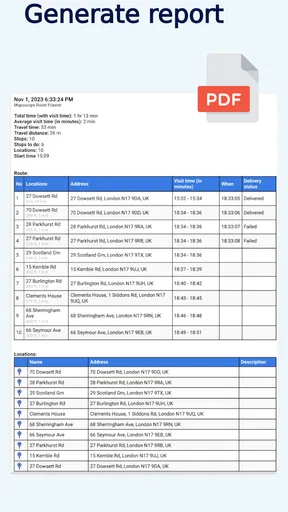
Absolutely! The app allows you to share your planned routes via email or messaging apps. This feature is particularly useful for coordinating with team members or sharing itineraries with friends and family, ensuring everyone has the same route information.
Does the Multi-Stop Route Planner integrate with other navigation apps?
Yes, the app integrates seamlessly with popular navigation apps like Google Maps and Apple Maps. Once your route is planned, you can open it in your preferred navigation app for turn-by-turn directions, combining efficient route planning with familiar navigation interfaces.


